Wednesday, October 23, 2013


Saturday, July 13, 2013
Flashing JB ALPHA 1/2/3/4/5/6/7 or Any ROM
Flashing JB ALPHA 1/2/3/4/5/6/7 or Any ROM
Requirements: XXKPE, DDLK2, Odin,Alpha any ROM, Gapps. (Links for the roms and root are provided at the end)
NOTE :- First we will load XXKPE to revive partitions and remove the bugs before they emerge. Extract XXKPE and DDLF2 on desired path. Don’t forget to wipe cache and factory reset after each rom flashing for great performance and no bug issues.
Follow the steps as below mentioned.
1 -> Take a backup of contacts, by go to contacts -> menu -> Import/Export.
2 -> Take a backup of SMS via ‘SMS backup and restore’ Free Market App by RiteshSahu.
3 -> Copy contact generated vsf file and sms backup file to your machine.
4 -> Switch Off your mobile.
5 -> Put your mobile in Downloading mode by Pressing Volume Down key + the Home key and holding them press the Power button. Screen will looks like as below.

6 ->Now Start ODIN
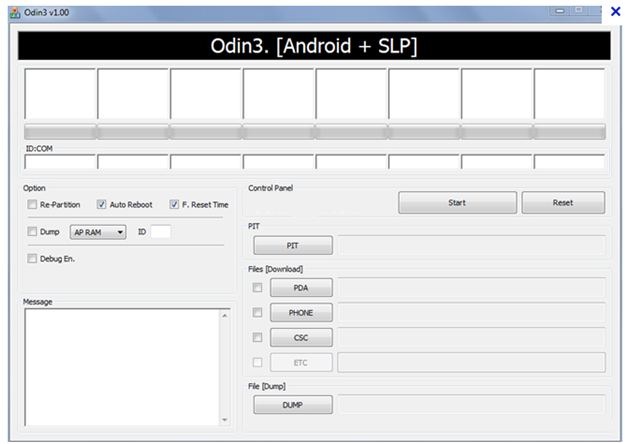
7 ->Connect Mobile To Computer, you will see the ID:COM port light up in ODIN with port number on which your phone is connected like the image below.

8 -> Now click on PIT button and select latona_20110114.pit and check the Repartition below the ID:COM as displayed in above screen and click on Start button.

9 -> it will show a blank screen once it’s flashed, now disconnect the phone from computer and remove your mobile battery and put it back.

10 -> Now again bring your phone back in download mode.
11 -> Now in Odin ID:Com will light up again once phone got connected to Compute, then uncheck the repartition box (it will be unchecked automatically sometimes)

12 ->Now click on BOOT LOADER and select the APBOOT_I9003XXKPE_CL409735_REV08_user_low_ship.tar.md5 file
13 -> Click on PDA and select the CODE_I9003XXKPE_CL409735_REV08_user_low_ship.tar.md5
14 -> Click on PHONE and select the MODEM_I9003XXKPE_REV_00_CL1041909.tar.md5
15 -> Click on CSC and select the GT-I9003-CSC-MULTI-OXAKPE.tar.md.
16 -> Now click on Start.

17 -> Wait for process to complete and do not detach phone from PC until it finishes successfully (you will see ‘PASS’ with green color as shown in picture below).

18 -> XXKPE flashing process completed, now we will flash DDLF2.
19 -> Switch Off your mobile.
20 ->Put your mobile in Downloading mode by Pressing Volume Down key + the Home key and holding them Power button. Screen will looks like as below.

21 -> Now connect your phone to computer, in ODIN, ID:COM box will turn into yellow.

22 -> Now click on PDA and select I9003DDLF2_I9003ODDLF2_I9003DDLE1_HOME.tar.md5.
NOTE: - While loading XXKPE we had 5 flashes file with us, but in DDLF2 we would have 1 only.
23 -> Now click on start button.
24 ->Wait for process to compete and do not detach phone from PC until it finishes successfully.
25 -> DDLF2 flashing completed.
26 -> Now switch off your phone to flash the root. Put your mobile in Downloading mode by Pressing Volume Down key + the Home key and holding them Press the Power button. Screen will looks like as below.
27 -> Now connect you mobile to computer, now click on PDA in ODIN and go to cf-root folder where you have downloaded the cf-root.

28 ->If it’s not showing you any file in folder then just write the file name in box then it will auto appear.
29 -> Click on start. And wait till process got completed.
30 -> Now copy alpha6 or 7 or any ROM file you want in your sdcard “CM10.1-GalaxySL-JDQ39E-Alpha7.zip”.
31 -> Switch of your phone and start in recovery mode by Pressing Volume UP key + the Home key and holding them press the Power button.
32 ->It will start in CWM recovery mode.
33 -> Select clear Cache.
34 -> Click on install zip from sdcard and just select the CM10.1-GalaxySL-JDQ39E-Alpha7.zip file.
35 -> Select clear Cache.
36 -> Click on install zip from sdcard and just select the GAPPS file "gapps-jb-20130301-signed.zip"
37 -> Now select Advance -> then select Fix Permissions.
38 -> Now select Reboot.
33 -> Select clear Cache.
34 -> Click on install zip from sdcard and just select the CM10.1-GalaxySL-JDQ39E-Alpha7.zip file.
35 -> Select clear Cache.
36 -> Click on install zip from sdcard and just select the GAPPS file "gapps-jb-20130301-signed.zip"
37 -> Now select Advance -> then select Fix Permissions.
38 -> Now select Reboot.
Cheers………. You are on your new ROM now.
To support My work download "Call log & SMS Cleaner app"
Links:
XXKPE: DOWNLOAD
DDLF2: DOWNLOAD
CF-Root: DOWNLOAD
CM10.1: http://a3mania.com/cyanogenmod/
CM10.1: http://a3mania.com/cyanogenmod/
Gapps: DOWNLOAD
CREDITs :
To support My work download "Call log & SMS Cleaner app"
Keyword :-
Jelly Bean on gamsung galaxy sl i9003, Root Samsung galaxy sl i9003, JB 4.1 4.2 flash on samsung galaxy sl I9003.
Flash Custome ROM on galaxy i9003.
Saturday, January 5, 2013
Change the language in Photoshop portable
Many guys looking for Photoshop Portable,
You will get setup files from any portal or blog, but they may or may not in ENGLISH language.
So the simple way to change the language option is show in below video.
You will get setup files from any portal or blog, but they may or may not in ENGLISH language.
So the simple way to change the language option is show in below video.
Sunday, December 16, 2012
Root your Samsung galaxy SL i9003
Required tool and CFROOT:
1 -> CFROOT based on your ROM download from here
CF-Root for
most I9003 firmwares.
All the credit goes to Skin's cf-root and his great help in resolving issues.
UtterChaos Kernel Credit goes to DoomLord and Napster.
Cwm 5.0.2.8 (Credit Amit Bagaria)
XWLF2, DDLF2 and XXLE4 will require clean Firmware Flash for the CF-root to work.
If You are already using any other CF-root, these CF-roots won't probably work.
Flash the Firmware again and then flash the CF-root.
Here are the links.
POLJ1-CFROOT-08-11-2012.tar
XWLF3-CFROOT-12-07-2012.tar
XWLF2_CFROOT-05-07-2012.tar (CWM 5.0.2.8)
XWLF2-CFROOT-30-06-2012.tar
DDLF2_CFROOT-05-07-2012.tar (CWM 5.0.2.8)
DDLF2-CFROOT-30-06-2012.tar
XXLE4_CFROOT-05-07-2012.tar (CWM 5.0.2.8)
XXLE4-CFROOT-30-06-2012.tar
ZHKPE-CFROOT-25-05-2012.tar
JXKP3-CFROOT-25-05-2012.tar
XXKPU-CFROOT-29-02-2012.tar
DDKP3-CFROOT-12-02-2012.tar
DDKP2-CFROOT-23-12-2011.tar
DDKP2-CFROOT-19-12-2011.tar
DDKP1-CFROOT-23-12-2011.tar
DDKP1-CFROOT-19-12-2011.tar
XXKPQ-CFROOT-UCK-16-12-2011.tar
With UC Kernel V6.
CFROOT-XXKPQ-17-11-2011.tar
Module: tun.ko for XXKPQ.
CF-ROOT-XIKP2-16-11-2011.tar
CF-ROOT-ZHKPD-11-11-2011.tar
Module: tun.ko for ZHKPD.
CF-ROOT-XXKPN-09-11-2011.tar
Module: tun.ko for XXKPN.
CF-ROOT-XWKPG-08-11-2011
CF-ROOT-DXKP9-10-11-2011.tar
Module: tun.ko for DXKP9.
CF-ROOT-ZCKP9-12-11-2011.tar
Flash it with ODIN as PDA (refer step 2).
All the credit goes to Skin's cf-root and his great help in resolving issues.
UtterChaos Kernel Credit goes to DoomLord and Napster.
Cwm 5.0.2.8 (Credit Amit Bagaria)
XWLF2, DDLF2 and XXLE4 will require clean Firmware Flash for the CF-root to work.
If You are already using any other CF-root, these CF-roots won't probably work.
Flash the Firmware again and then flash the CF-root.
Here are the links.
POLJ1-CFROOT-08-11-2012.tar
XWLF3-CFROOT-12-07-2012.tar
XWLF2_CFROOT-05-07-2012.tar (CWM 5.0.2.8)
XWLF2-CFROOT-30-06-2012.tar
DDLF2_CFROOT-05-07-2012.tar (CWM 5.0.2.8)
DDLF2-CFROOT-30-06-2012.tar
XXLE4_CFROOT-05-07-2012.tar (CWM 5.0.2.8)
XXLE4-CFROOT-30-06-2012.tar
ZHKPE-CFROOT-25-05-2012.tar
JXKP3-CFROOT-25-05-2012.tar
XXKPU-CFROOT-29-02-2012.tar
DDKP3-CFROOT-12-02-2012.tar
DDKP2-CFROOT-23-12-2011.tar
DDKP2-CFROOT-19-12-2011.tar
DDKP1-CFROOT-23-12-2011.tar
DDKP1-CFROOT-19-12-2011.tar
XXKPQ-CFROOT-UCK-16-12-2011.tar
With UC Kernel V6.
CFROOT-XXKPQ-17-11-2011.tar
Module: tun.ko for XXKPQ.
CF-ROOT-XIKP2-16-11-2011.tar
CF-ROOT-ZHKPD-11-11-2011.tar
Module: tun.ko for ZHKPD.
CF-ROOT-XXKPN-09-11-2011.tar
Module: tun.ko for XXKPN.
CF-ROOT-XWKPG-08-11-2011
CF-ROOT-DXKP9-10-11-2011.tar
Module: tun.ko for DXKP9.
CF-ROOT-ZCKP9-12-11-2011.tar
Flash it with ODIN as PDA (refer step 2).
2 -> Odin tool
1 -> Take a backup of contacts, by go to contacts -> menu -> Import/Export.
2 -> Take a backup of SMS via ‘SMS backup and restore’ Free Market App by RiteshSahu.
3 -> Copy contact generated vsf file and sms backup file to your machine.
4 -> Switch Off your mobile.
5 -> Put your mobile in Downloading mode by Pressing Volume Down key + the Home key and holding them press the Power button. Screen will looks like as below.
6 ->Now Start ODIN
7 ->Connect Mobile To Computer, you will see the ID:COM port light up in ODIN with port number on which your phone is connected like the image below.
8 -> Now click on PDA in ODIN and go to cf-root folder where you have downloaded the cf-root.
9 ->If it’s not showing you any file in folder then just write the file name in box then it will auto appear.
10 -> Click on start. And wait till process got completed.
Friday, November 2, 2012
ICS Navigation bar
This file are CWM flashable for those who's mobile soft key's are not working.


Procedure to flash the files
1 -> Switch of your
phone and start in recovery mode by Pressing Volume UP key + the Home key and
holding them press the Power button.
2 ->it will start
in CWM recovery mode.
3 -> Click on
install zip from sdcard and just flash the Add ICS Navigation Bar.zip
file.
4 -> After flash
complete, select reboot phone.
For Remove NavBar just follow the same procedure and select Remove Navigation Bar.zip instead of ICS Navbar.zip and you done.
Tuesday, September 18, 2012
Hulk Boot on Samsung Galaxy SL GT i9003

Download bootanimation.zip
Take a backup of your original bootanimation.zip from /system/media/
Now put a downloaded boot animation file in /system/media/
only for Rooted phone.
Favourite Game : Ewarriors2
Favourite App : Mogli , Social Networking app
Sunday, September 9, 2012
CM 10 Boot on Samsung Galaxy SL GT i9003
CM 10 Boot Animation on Galaxy SL i9003.

Watch Video
Download bootanimation.zip
Take a backup of your original bootanimation.zip from /system/media/
Now put a downloaded boot animation file in /system/media/
only for Rooted phone.
Favourite Game : Ewarriors2
Favourite App : Mogli , Social Networking app
Watch Video
Download bootanimation.zip
Take a backup of your original bootanimation.zip from /system/media/
Now put a downloaded boot animation file in /system/media/
only for Rooted phone.
Favourite Game : Ewarriors2
Favourite App : Mogli , Social Networking app
Wednesday, August 22, 2012


Thursday, August 2, 2012
Mowgli-The Jungle Book

Description
Most of the Indians have their childhood friend Mowgli.
 Please provide your valuable feedback.
Play is totally depends on your internet speed, on 3G/WIFI it works flawless.
if you face any speed/stream issue, please off the HQ mode of your YouTube app.
Note :- Youtube application is mandatory
https://play.google.com/store/apps/details?id=com.google.android.youtube
“This free app is ad supported and may contain ads in the notification tray”
TAGS:Mowgli, Jungle book, sher khan. Cartoon, story , mogli
This application contains Mowgli cartoon(Jungle book) series videos in organized way.
The content provided in this app is hosted by YouTube.
Please provide your valuable feedback.Play is totally depends on your internet speed, on 3G/WIFI it works flawless.
if you face any speed/stream issue, please off the HQ mode of your YouTube app.
We used youtube app to remove the flash player dependency so every mobile users can use this application.
Note :- Youtube application is mandatory
https://play.google.com/store/apps/details?id=com.google.android.youtube
“This free app is ad supported and may contain ads in the notification tray”
TAGS:Mowgli, Jungle book, sher khan. Cartoon, story , mogli
Wednesday, July 11, 2012
CF ROOT for XWKPG
Thursday, July 5, 2012
PNR and Indian Rail Enquiry
Description
 PNR and Indian Rail
Enquiry gives the information of reservations of Indian Railways.
PNR and Indian Rail
Enquiry gives the information of reservations of Indian Railways.
Simple Interface. Give
your PNR and it will show reservation status & also maintains PNR history
automatically for future reference. also get journey details like coach no,
berth no and quota.
Also Book Tickets by
IRCTC & Check seat availability, fare enquiry, arrivals/departures, get
train schedule and it's live running status.
it facilitate to add
your favorite trains to favorite train list.
Features:
★ Get PNR Status & Maintain History
★ Book Tickets By IRCTC
★ Seat Availability
★ Find Trains [between stations]
★ Train Fare Enquiry
★ Arrivals / Departures
★ Train Schedule
★ Train Running Status
★ Favourite Trains


App also facilitate to
share travel details with friends and family members.
★ Refer to legend to know codes and it's
description.
★ see help for more
Don't forget to give
your feedback or suggestions.
Give ratings for app.
Subscribe to:
Posts (Atom)